


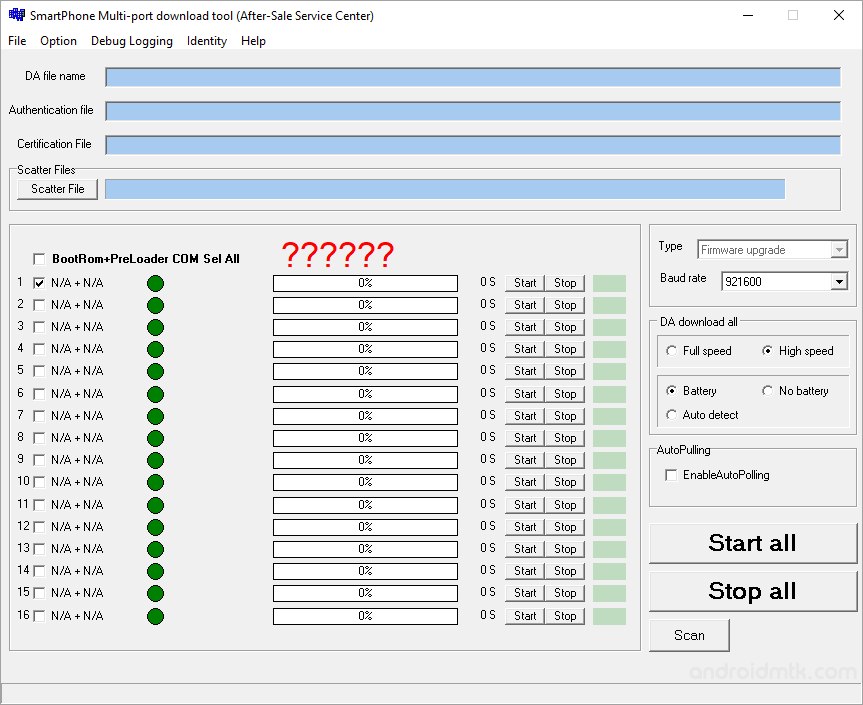
MTK SP Multi Port Download Tool is a compact Windows application designed to flash or install scatter-based firmware (ROM) on devices powered by MediaTek chipsets.
Features of MTK SP Multi Port Download Tool
Explore the powerful capabilities of this tool, designed to help you manage and flash your MediaTek devices with ease and precision, thanks to its core built-in features.
Flash Firmware
This tool enables you to flash or install scatter-based firmware (ROM) on MediaTek devices. Load your scatter file, then click Flash to start the installation process.
Format Bootloader
The tool allows you to format or delete the bootloader on your mobile device. Use this feature with caution, as improper formatting may lead to a device bootloop or startup issues.
Set Flashing Speed
Users can choose between High Speed and Full Speed options. Selecting High Speed ensures faster flashing than the standard Full Speed setting, saving you valuable time during updates.
Device Detection
The SP Multi-Port Download Tool features an Auto Detect function. This allows the software to identify your mobile device, whether it is connected to the battery or not.
Advanced Options
Beyond basic flashing, you can delete NVRAM backup data, remove OTP locks, or perform an OTP format. These additional features provide granular control over your device’s internal memory and security.
Download SP Multi Port Download Tool
SP Multi Port Download Tool is compatible with all versions of Windows, from Windows XP to Windows 11 (x32 or x64). If you are looking for a specific version of the tool, use the following links:
| Version | Download |
|---|---|
| v3.1032 | Link |
| v3.1108 | Link |
| v3.1228 | Link |
| v3.1304 | Link |
| v3.1324 | Link |
| v3.1332 | Link |
| v3.1408 | Link |
| v3.1420 | Link |
| v3.1424 | Link |
| v3.1428 | Link |
| v3.1436 | Link |
| v3.1444 | Link |
| v3.1452 | Link |
| v3.1504 | Link |
| v3.1512 | Link |
| v3.1516 | Link |
| v3.1520 | Link |
| v3.1528 | Link |
| v3.1532 | Link |
| v3.1544 | Link |
| v3.1548 | Link |
| v3.1604 | Link |
| v3.1616 | Link |
| v3.1620 | Link |
| v3.1624 | Link |
| v3.1632 | Link |
| v3.1636 | Link |
| v3.1644 | Link |
| v3.1648 | Link |
| v3.1652 | Link |
| v3.1708 | Link |
| v3.1712 | Link |
| v3.1716 | Link |
| v3.1724 | Link |
| v3.1728 | Link |
| v3.1732 | Link |
| v3.1744 | Link |
| v3.1748 | Link |
| v3.1752 | Link |
| v3.1804 | Link |
| v3.1812 | Link |
| v3.1820 | Link |
| v3.1824 | Link |
| v3.1828 | Link |
| v3.1832 | Link |
| v3.1836 | Link |
| v3.1844 | Link |
| v3.1904 | Link |
| v3.1916 | Link |
| v3.1944 | Link |
| v3.2012 | Link |
| v3.2020 | Link |
| v3.2036 | Link |
| v3.2048 | Link |
Notes
- How to Use: To learn how to use the SP Multi Port Download Tool to flash firmware, visit our Step-by-Step Guide.
- Alternative Tools: SP Flash Tool, Sugar MTK SP Flash Tool, and Infinix Flash Tool are excellent alternatives for flashing MediaTek devices.
- MediaTek Driver: Ensure the correct drivers are installed. You can download them from the MediaTek Driver page.
- Credits: MTK SP MultiPort Download Tool is developed by MediaTek Inc. All credits go to them for providing this utility to the community for free.

