


MTK IMEI Tool is a small application for Windows computers that allows you to write or flash IMEI on MediaTek devices. It is a lightweight utility designed for single-SIM hardware.
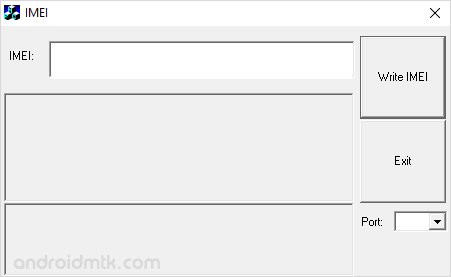
Features of MTK IMEI Tool
Discover the powerful capabilities of MediaTek IMEI Tool. These features make it easy to manage your device identification numbers quickly and safely on any modern Windows desktop or laptop.
Portable Application
MediaTek IMEI Tool is fully portable, meaning no installation is required on your PC. Extract the folder and run the executable file to begin the IMEI flashing process immediately.
Small and Easy to Use
MediaTek IMEI Tool features a lightweight interface that lets you flash identification numbers in just a few clicks. Its simple design ensures that even beginners can navigate the writing process easily.
Flash Single IMEI
MediaTek IMEI Tool is specifically designed to flash or write a single IMEI number on MediaTek devices with one SIM slot. It provides a stable connection for consistent and reliable results.
Windows Compatibility
MediaTek IMEI Tool is compatible with various Windows versions, supporting both 32-bit and 64-bit architectures. This ensures broad support across different computer setups for all users needing to repair their devices.
Download MTK IMEI Tool
The following are the links from which you can obtain the tool for Windows (32-bit or 64-bit).
| Version | Download |
|---|---|
| v1.0.0.1 | Link |
Notes
- How to Open: After obtaining the IMEI Tool, extract it on your computer > Open the extracted folder > Debug > WriteIMEI.exe.
- Supports Single IMEI: It only allows you to flash or write the IMEI on Single-SIM devices (MediaTek). If your device has Multiple SIM Slots, then use SN Write Tool to flash multiple IMEIs at the same time.
- Caution: Flashing or changing IMEI other than the original IMEI is illegal in many countries and may cause serious trouble to you.
- What’s the current IMEI Number? To know the current IMEI number of your device, Dial *#06# on the device. You can also find the IMEI number on the back sticker of your device (after removing the battery).
- Credits: MTK IMEI Tool is created and distributed by AppWizard. This application uses the basics of Microsoft Foundation Classes.

