


LiveSuit is a lightweight Windows utility designed to flash stock firmware (.img) on devices powered by Allwinner chipsets, including the popular A10, A13, A20, and A31 series.
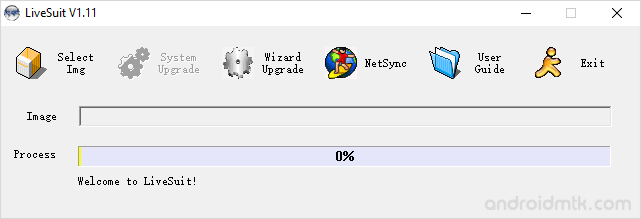
Features of LiveSuit
Check out these useful features that make this tool a great choice for managing your Allwinner devices and keeping your mobile firmware up to date with ease and speed.
Installer Application
LiveSuit comes as a standard installer, requiring a quick setup on your PC. After installation, navigate to the extracted folder and run the executable file to begin.
Upgrade Wizard
The built-in wizard provides a helpful step-by-step guide for loading firmware. Upon launching, it prompts you to enter the guide mode, which simplifies the entire flashing process for users.
Support Allwinner Chipset
LiveSuit is specifically optimised for devices running on Allwinner hardware. Once you install the necessary drivers, the application instantly detects your connected device and prepares it for the update.
Support .img Format
The LiveSuit is designed to flash stock firmware specifically in the .img format. This makes it easy to find and apply compatible files on your smartphone or tablet.
Multi-Platform Compatibility
Beyond Windows, specific versions of LiveSuit are available for Linux and macOS users. This ensures that you can service your Allwinner devices regardless of your preferred desktop operating system.
Download LiveSuit Tool
LiveSuit Tool is compatible with all versions of Windows, from Windows XP to Windows 11 (x32 or x64). If you are looking for the latest version of the LiveSuit, use the following links:
| Version | Windows | Linux | MacOS |
|---|---|---|---|
| v1.05 | Link | – | – |
| v1.06 | Link | – | – |
| v1.07 | Link | – | – |
| v1.09 | Link | – | – |
| v1.11 | Link | – | Link |
| v3.05 | – | 32-Bit | 64-Bit | – |
Notes
- How to use: If you want to learn to use the LiveSuit to Flash Stock Firmware, then head over to How to use LiveSuit page.
- Device Not Found Error: If you face a Device Not Found error, it means your device is not correctly connected to the computer. To fix this, reinsert the USB cable into the computer, or try another USB cable.
- Alternative Tool: We have also shared a list of tools that allow you to flash or install Firmware on Allwinner Devices. You can check them all from our Allwinner Tool Section.
- Credits: Live Suit is created and distributed by Allwinner Technology Co., Ltd. So, full credit goes to them for sharing the tool for free.

