


OPlus EDL Tool is a powerful cross-platform GUI for EDL (Emergency Download) flashing on OPLUS devices (Oppo, OnePlus, Realme). It simplifies complex Firehose protocol operations, enabling users to unbrick devices, flash ROMs, manage partitions, and handle encrypted OFP/OPS packages with minimal manual commands.
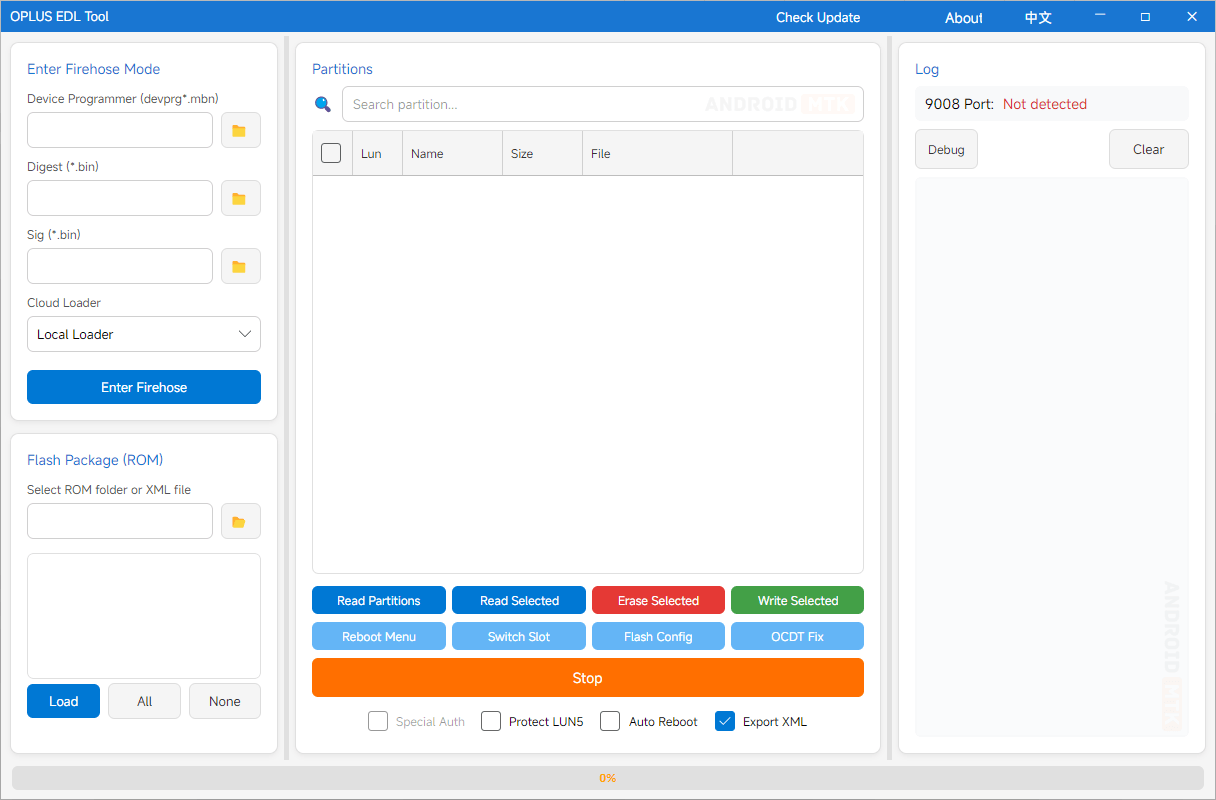
Features of OPlus EDL Tool
OPlus EDL Tool provides a clean and efficient interface that simplifies EDL flashing and partition management for OPLUS devices. Exploring each feature will help you understand its function and benefits.
Enter Firehose Mode
OPlus EDL Tool allows one-click entry into Firehose mode by loading the device programmer (devprg*.mbn), digest, and signature files. It supports automatic detection of the Qualcomm 9008 EDL port for seamless connection on supported chipsets.
Flash ROM Packages
It offers easy flashing of extracted ROM folders, OFP, and OPS encrypted packages. Users select rawprogram XML files, parse partitions, and batch flash selected ones with super partition auto-merge support.
Partition Management
It enables reading the full partition table from the device. Users can then read, write, erase individual or multiple partitions, and perform backups directly in EDL mode.
Super Partition Support
It automatically merges segmented super images (super.0.xxx.img etc.) using super_def.json definitions. This ensures complete and error-free handling of dynamic super partitions during flashing.
OFP/OPS Decryptor
Built-in support for decrypting and processing OFP- and OPS-encrypted ROM packages. It extracts necessary files and partitions internally, allowing direct flashing without separate decryption tools.
Auto Port Detection
The interface automatically detects the Qualcomm HS-USB QDLoader 9008 EDL port. This eliminates manual COM port selection and speeds up Firehose connection.
Multi-Language Interface
It features a clean bilingual interface supporting English and Chinese. Users can switch languages instantly for better accessibility across global OPLUS device communities.
Cloud Loader Integration
Newer versions include chipset-based cloud loading for Firehose files (programmer, digest, signature). This simplifies setup by automatically fetching matching ELF files for supported chipsets.
Partition Backup & Restore
Users can back up critical partitions like persist, modem, EFS, and OCDT. Restore operations allow the selective recovery of backed-up images to unbrick or repair devices safely.
Device & Chipset Support
It supports a wide range of OnePlus, OPPO, and Realme devices with Qualcomm chipsets (e.g., SM8750, SM8650, SM8550). The tool works for both old and new models in EDL mode.
Download the OPlus EDL Tool
Following are the links from which you can download the tool for Windows (32-bit or 64-bit).
| Version | Download |
|---|---|
| 2.0.0 | Link |
| 3.2026.025 | Link |
Notes
- Qualcomm EDL Drivers: Install the latest Qualcomm HS-USB QDLoader 9008 drivers. Use USB 2.0 ports and a high-quality cable for a stable connection.
- EDL Mode Entry: Boot your device into EDL mode by pressing Volume Up + Down while connecting USB, or via ADB/Fastboot commands such as “adb reboot edl”.
- Warnings: Flashing can brick your device. Always back up important partitions (avoid persist/EFS unless experienced). Use the correct Firehose files matching your chipset. The tool is for educational and development purposes.
- Credits: OPlus EDL Tool is developed by salokrwhite. Full credit goes to the developer for this open-source EDL solution (v2).

