


Huawei HiSuite is a professional PC Suite application developed by Huawei Technologies Co. Ltd. It allows users to manage their Huawei mobile devices seamlessly from a Windows or Mac computer.
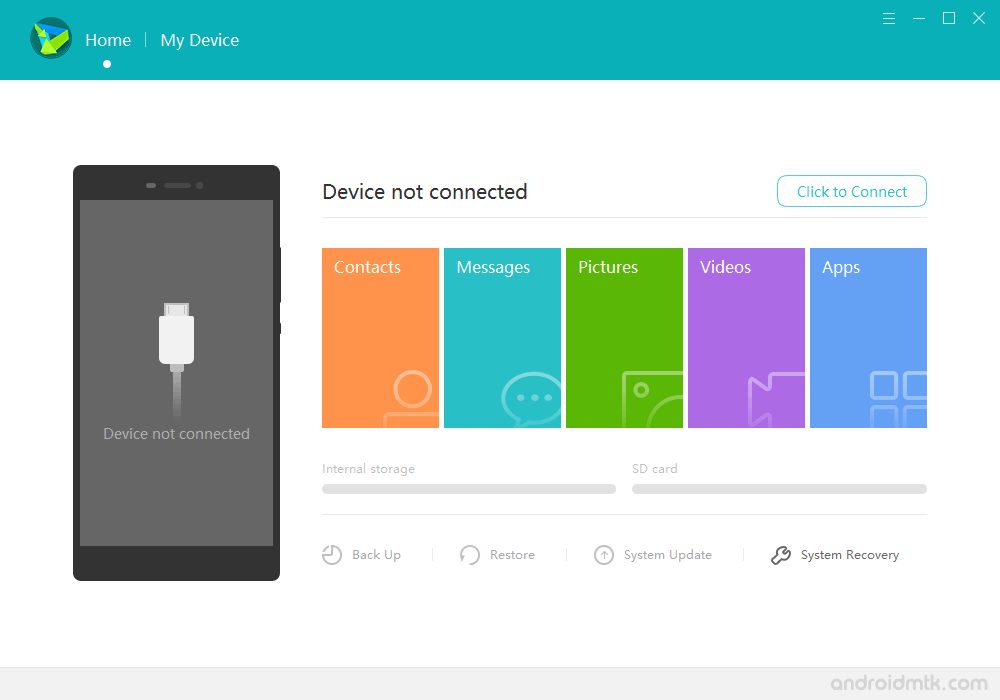
Features of Huawei HiSuite Application
The Huawei HiSuite application offers several helpful tools to manage your mobile data, apps, and system updates directly from your desktop or laptop.
Contacts Management
This tool lets you create, edit, or delete contacts on your Huawei device from your computer. You can also easily import and export contact lists between devices.
Messages
Easily compose and send messages to multiple recipients from your PC. This feature also allows you to import or export your chat history for safekeeping and easy access.
Pictures Management
Browse all images stored on your smartphone and transfer them to your computer quickly. This makes it very simple to organise your gallery and share photos with your friends.
Video Management
View your mobile videos on a larger screen and move files between your device and computer. This feature is perfect for managing storage and backing up your favourite clips.
Screenshot
Take real-time screenshots of your mobile screen and save them directly to your computer. This removes the need for manual file transfers when capturing important information from your phone.
App Management
View all installed applications and uninstall unwanted ones with a single click. You can also install third-party apps directly from your computer to your Huawei smartphone with total ease.
Backup and Restore
Secure your important data, including contacts, messages, and media, by creating a full backup. You can restore this information at any time to prevent data loss during device transitions or resets.
System Update
Update your Huawei device to the latest software version using your computer. The application automatically checks for new firmware and installs it without requiring manual package downloads.
User Interface Customization
Personalise your mobile experience by managing themes and wallpapers directly through the suite. This feature lets you browse and apply new visual styles to your device effortlessly from your PC.
Download Huawei HiSuite Application
HiSuite is compatible with all versions of Windows, from Windows XP to Windows 11 (32- or 64-bit). If you are looking for the latest version of HiSuite, use the following links to access it on your computer:
| Version | Windows | MacOS |
|---|---|---|
| v1.8.1.260 | Link | – |
| v2.3.15 | Link | – |
| v4.0.4.204 | Link | – |
| v4.0.5.300 | Link | – |
| v4.0.7.300 | Link | – |
| v5.0.1.300 | Link | – |
| v5.0.2.300 | Link | – |
| v5.0.2.301 | Link | – |
| v8.0.1.300 | Link | – |
| v9.0.3.300 | Link | – |
| v9.1.0.300 | Link | – |
| v10.0.0.510 | Link | – |
| v10.0.1.100 | Link | – |
| v10.1.0.550 | Link | – |
| v11.0.0.360 | Link | – |
| v11.0.0.500 | Link | – |
| v11.0.0.510 | Link | – |
| v11.0.0.530 | Link | – |
| v11.0.0.550 | Link | – |
| v11.0.0.560 | Link | – |
| v11.0.0.570 | Link | – |
| v11.0.0.580 | Link | – |
| v11.0.0.590 | Link | – |
| v11.0.0.610 | Link | – |
| v11.0.0.650 | Link | – |
| v13.0.0.310 | Link | – |
| v14.0.0.300 | Link | – |
| v14.0.0.310 | Link | – |
| v14.0.0.320 | Link | – |
| v14.0.0.340 | Link | – |
| v14.0.0.370 | Link | Link |
Notes
- Compatibility: The Huawei HiSuite Application is compatible with Windows XP, Vista, Windows 7, Windows 8, Windows 8.1, and Windows 10 only.
- Huawei Stock Firmware: If you are looking for the original Stock Firmware, then head over to the Huawei Stock Firmware page.
- Huawei USB Driver: If you are looking for the official Huawei USB Driver, then head over to the Download Huawei USB Driver page.
- PC Suite: If you are looking for PC Suite Applications for other Mobile Brands, then head over to our PC Suite Section.
- Credits: Huawei HiSuite Application is officially created and distributed by Huawei Mobile, Inc. So, full credit goes to them for sharing the tool for free.

