


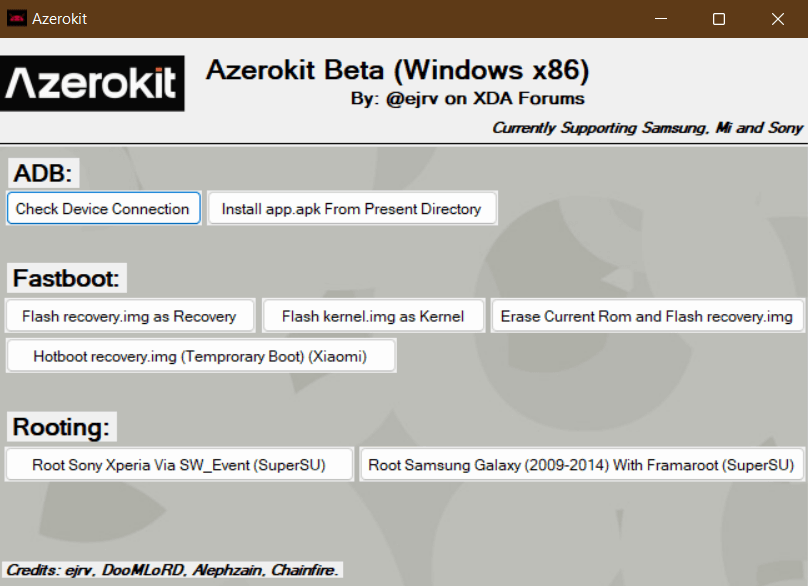
Azerokit is a robust Windows utility that simplifies the management and customisation of Android devices. It empowers users to root their devices easily, manage ADB, and utilise Fastboot functions through a centralised interface. Engineered for both beginners and power users, Azerokit makes complex tasks like debugging and rooting feel seamless and accessible.
Features of Azerokit
Azerokit serves as a powerful bridge between your PC and Android smartphone. It helps you unlock hidden potential through rooting and offers a unified hub for managing system files and advanced modifications.
Root Devices
Azerokit provides a streamlined, user-friendly way to gain root access safely. The tool features a guided process that walks you through every requirement, ensuring a hassle-free experience even for those new to Android modification.
Fastboot Flashing
Take full control of your device’s performance with Azerokit’s Fastboot integration. This feature allows you to flash custom ROMs, recoveries, and kernels with precision, simplifying the installation and updating of custom software.
Fastboot Recovery
Azerokit makes it easy to access and install custom recoveries. Using Fastboot, you can quickly deploy tools to create full-device backups, perform deep system maintenance, or recover from software-related boot issues.
APK Installation
By leveraging ADB integration, Azerokit lets you install APK files directly from your computer. This is ideal for sideloading apps unavailable on the Play Store or performing batch installations across multiple devices simultaneously.
Support
Azerokit is compatible with a wide array of devices from leading manufacturers, including Samsung, Sony, and Xiaomi. Furthermore, it offers extensive support for unlocked devices and major global carriers, ensuring reliability across various network configurations.
Download Azerokit
Following are the Download links from which you can download the tool for Windows (32-bit or 64-bit).
| Version | Download |
|---|---|
| 20230912 | Link |
| 1.24 | Link |
Notes
- Beta: Azerokit is still in the early phase of development (beta), therefore you might experience some bugs in the application.
- Upcoming Feature: Azerokit is soon going to introduce support for installing ZIP files using Fastboot which will eliminate the requirement of a custom recovery to flash custom mods, themes or system updates.
- Credits: Azerokit was created and distributed by Daniel Hoseini, the developer. Therefore, full credit goes to him for sharing this tool for free.

