


The SamFirm tool is a Small Application for Windows Computers that allows you to download the stock firmware for Samsung smartphones and Tablets.
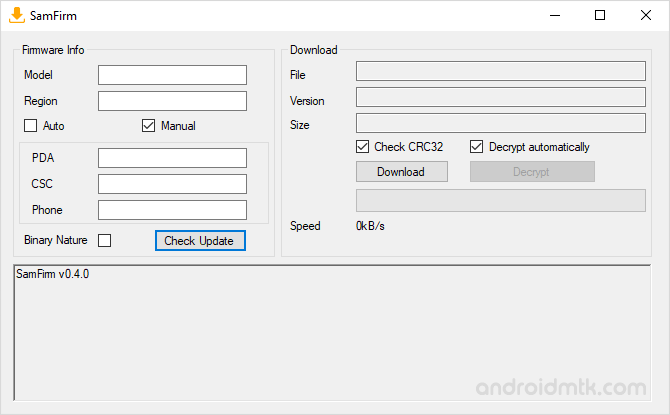
Features of SamFirm Tool
Check out the main features of this tool to understand how it helps you find and grab the official software for your mobile device in just a few clicks.
Portable Application
SamFirm is completely portable, meaning no installation is required on your Windows PC. Extract the files and run the program to start searching for your device firmware immediately.
Light Weight
SamFirm is designed to be lightweight, consuming minimal system resources during operation. While it uses some memory during decryption, it remains efficient and fast on most computer systems.
Firmware Access
Easily fetch official Samsung firmware in MD5 or tar formats for your specific device. SamFirm securely grabs encrypted files and automatically decrypts them once the transfer to your computer is complete.
Multiple Options
Search for firmware using your specific model number and region code. You can also manually enter PDA, CSC, and Phone details to identify the exact firmware version and size.
Auto Decryption
SamFirm includes a built-in feature that automatically decrypts binary files when they are saved. This ensures that the final firmware is ready for flashing without needing any external software.
Download SamFirm Tool
The following links let you download the tool for Windows (32-bit or 64-bit).
| Version | Download |
|---|---|
| v0.2.1 | Link |
| v0.2.2 | Link |
| v0.2.3 | Link |
| v0.2.4 | Link |
| v0.2.5 | Link |
| v0.2.6 | Link |
| v0.2.7 | Link |
| v0.2.8 | Link |
| v0.2.9 | Link |
| v0.3.0 | Link |
| v0.3.1 | Link |
| v0.3.2 | Link |
| v0.3.3 | Link |
| v0.3.4 | Link |
| v0.3.5 | Link |
| v0.3.6 | Link |
| v0.3.7 | Link |
| v0.3.8 | Link |
| v0.3.9 | Link |
| v0.4.0 | Link |
| v0.4.1 | Link |
| v0.5.0 | Link |
Notes
- Compatibility: It is compatible with Windows XP, Windows Vista, Windows 7, Windows 8, Windows 8.1 and Windows 10 (x32 or x64 bit).
- How to Use: If you want to learn to use the tool to download the stock firmware, then head over to How to use SamFirm Tool page.
- Samsung Stock Firmware: If you are looking for Stock Firmware for your Samsung Device, then head over to the Download Samsung Stock Firmware page.
- Samsung Combination Firmware: If you are looking for Combination Firmware for your Samsung Device, then head over to the Download Samsung Combination Firmware page.
- Samsung USB Driver: If you are looking for the original USB Driver, then head over to the Samsung USB Driver page.
- Credits: SamFirm was created and distributed by zxz0O0 (xda developer). So, full credit goes to him for sharing the Application for free.

