


Nokia X Manager is a small application for Windows computers that allows you to perform multiple tasks on your Nokia X Smartphone.
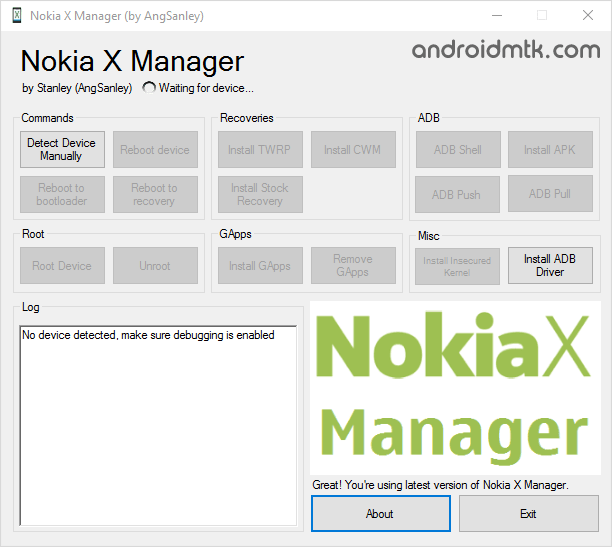
Features of Nokia X Manager
This tool offers several powerful options to help you easily manage your mobile device on your computer with just a few clicks and a USB data cable.
Simple Commands
Nokia X Manager provides button-based ADB commands, allowing you to manually detect your device, reboot into system mode, access the bootloader, or enter recovery mode with total ease and speed.
Install Recovery
This helpful feature enables you to quickly install custom recoveries like CWM or TWRP on your Nokia X or XL. You can also revert to the original stock recovery.
ADB Commands
Users can easily launch the ADB Shell to run advanced commands, install third-party applications directly from the PC, and perform essential ADB Push and Pull operations to transfer various files.
Quick Rooting
Gain full administrative access to your Nokia X or XL smartphone with a single click. Connect your mobile device, wait for detection, then tap the root button to begin.
Install Gapps
This feature allows you to add Google Apps to your Nokia device effortlessly. Please ensure your smartphone is rooted before installing or removing these applications.
Device Backup
Easily create a full backup of your important mobile data and system settings directly to your Windows computer, ensuring your information stays safe during advanced modifications or updates.
Download Nokia X Manager
The following links provide the tool for Windows (32-bit or 64-bit).
| Version | Download |
|---|---|
| v1.1.0.0 | Link |
| v2.0.0.1 | Link |
Notes
- How to Use: If you want to learn to use Nokia X Manager to root your Nokia X, Nokia X2 and Nokia XL, then head over to How to root Nokia X, Nokia X Plus, Nokia XL page.
- Nokia USB Driver: If you are looking for the Original USB Driver for Nokia X, Nokia X2 and Nokia XL smartphones, then head over to Nokia Driver page.
- How to unroot: If you wish to unroot your Nokia X or Nokia XL smartphone, then launch the Nokia Manager on your computer > connect the device to the computer > click on the unroot button.
- Credits: Nokia X Manager is created and distributed by angsanley (Xda developer). So, full credit goes to him for creating the Nokia users’ tool.

